


Czym jest Błyskawiczne doładowanie?
To doładowanie za które zapłacisz jednym kliknięciem bez przekierowania do serwisu transakcyjnego banku. Wystarczy, że się zalogujesz i zapamiętasz kod BLIK lub kartę płatniczą by doładować telefon szybciej, niż kiedykolwiek.
Instrukcja krok po kroku jak podpiąć BLIKa lub kartę płatniczą.
1. Zarejestruj się i zaloguj na doladowania.orange.pl
By zacząć korzystanie z doładowania.orange.pl. Pamiętaj o zalogowaniu zawsze, gdy będziesz korzystać z
2. Podepnij BLIKa lub kartę płatniczą
Błyskawiczne doładowanie BLIKiem
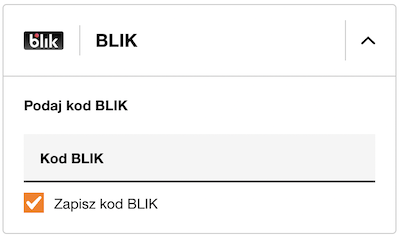
- Zaloguj się a następnie wybierz numer, który chcesz doładować oraz kwotę doładowania.
- Użyj kodu BLIK i zaznacz zgodę na zapamiętanie formy płatności (Dane BLIK będą bezpiecznie przechowywane na Twoim koncie).
- To już wszystko! Kolejne doładowanie zrealizujesz w kilka sekund - po zalogowaniu, wybraniu numeru i kwoty doładowania - płatność zatwierdzisz przyciskiem Zapłać zapisanym BLIKiem.
Błyskawiczne doładowanie kartą płatniczą
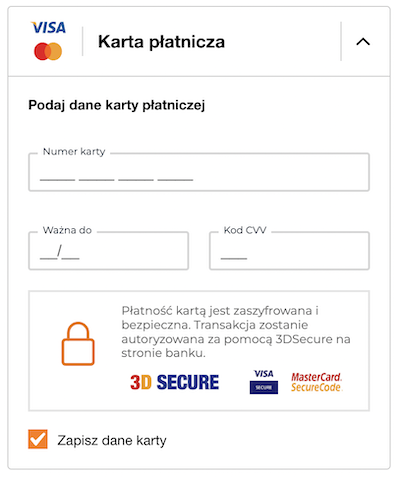
- Zaloguj się a następnie wybierz numer, który chcesz doładować oraz kwotę doładowania.
- Dodaj kartę płatniczą - uzupełnij formularz i zaznacz zgodę na zapamiętanie tej formy płatności (dane karty użytej będą bezpiecznie przechowywane na Twoim koncie.)
- To już wszystko! Kolejne doładowanie zrealizujesz w kilka sekund - po zalogowaniu, wybraniu numeru i kwoty doładowania - płatność zatwierdzisz przyciskiem Zapłać zapisaną kartą.
3. Doładuj telefon
Gdy masz zapamiętany BLIK lub kartę płatniczą doładowanie trwa tylko kilka sekund, a dodatkowo zawsze otrzymasz GB. Sprawdź jakie to proste.